Kennel booking software: from first message to a confirmed stay
Most kennel bookings start with a message: a name, a dog, some dates and a question about price. Then the details arrive in pieces over several days, and somebody has to copy them into a notebook or a spreadsheet.
Kennelio gives you a sign-up link to send instead. The client fills in their own details, and you decide what happens next.
A sign-up link clients fill in themselves
Clients open the link on their phone and enter their contact details, their dogs and the dates they want. The request comes to you; nothing is added to your records until a member of staff reviews it. There is no online payment and no instant confirmation, so you stay in control of every booking.
See which kennels are free
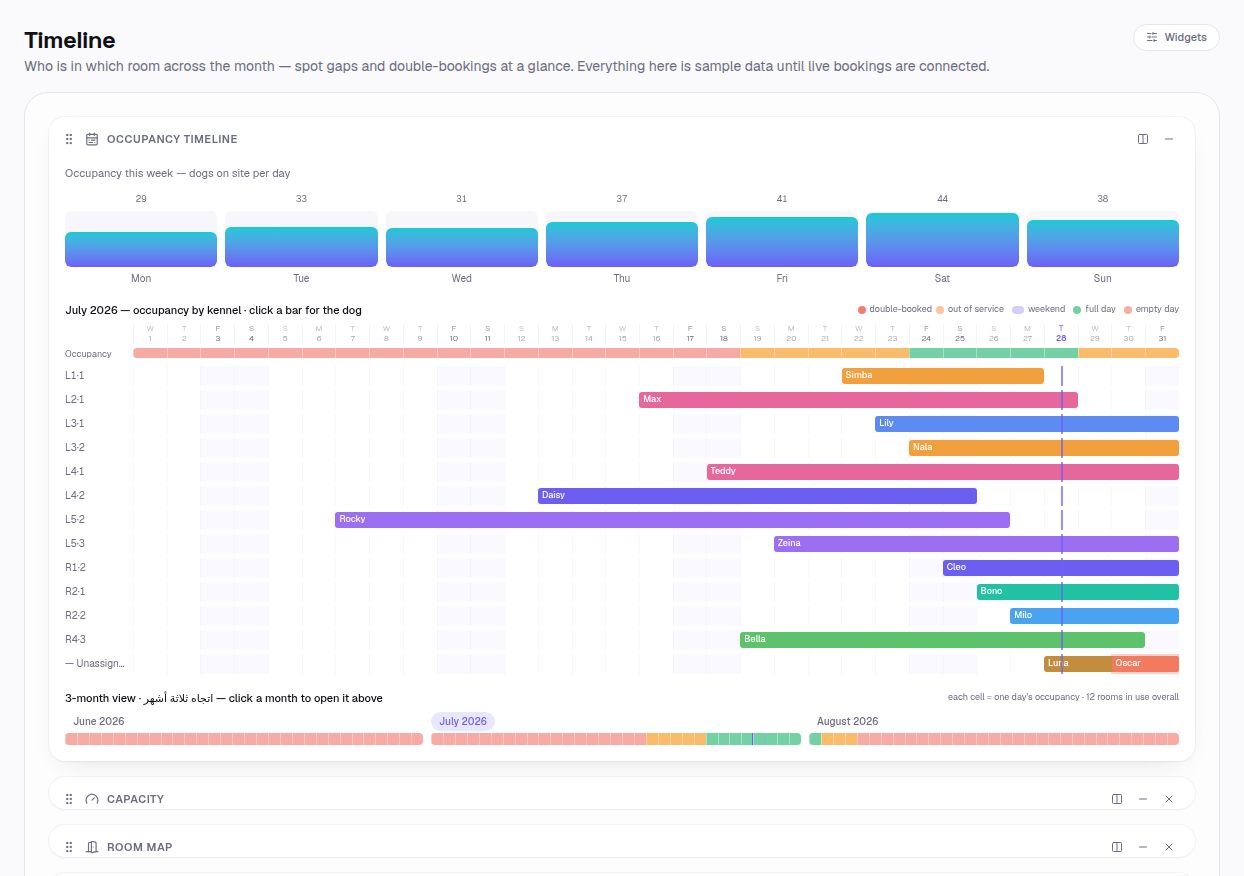
The room map shows today's kennels and the timeline shows the weeks ahead, so you can check the requested dates before you reply. Once a stay is booked it appears on both, along with the arrivals list for its first day.
Know where your bookings come from
Make a tagged copy of the link for each channel, such as Instagram, Facebook or a particular ad. Every request carries its tag, so you can see which channel brings in clients and which does not.
Questions, answered
Do clients pay when they sign up?
No. The link collects their details and the dates they want. Payments are recorded by your staff, by method, when they are received.
Is a booking confirmed as soon as the form is sent?
No. Each request waits for a member of staff to review it, so you decide which stays to accept.
Is the sign-up form in Arabic?
Yes. Clients can fill it in English or Arabic.